Which eCommerce Platform Is Right For You?
I get this question a lot - especially as more and more website and eCommerce platforms enter the market promising to be the ‘all-in-one’ eCommerce solution. Choosing the right platform matters, but it doesn’t have to be confusing. Below is a short and sweet comparison of the most popular eCommerce platforms out there, outlining their pricing, key features, pros and cons, and who each platform is best for.
If you’re deciding between a few options (or just want someone else to handle it), reach out to us, we’d love to help you design, customize, and launch your online store, that’s what we do!
The Big Players
Shopify
For true online stores, growing shops, businesses selling physical/digital products.
PLANS
Basic: ≈ $39/month (≈ $29/month if billed annually) – full online store with unlimited products, core features & basic reporting
Shopify: ≈ $105/month (≈ $79/month if billed annually) – better reports, lower fees, and more staff accounts for growing stores
Advanced: ≈ $399/month (≈ $299/month if billed annually) – advanced reporting, custom shipping rates, and lowest transaction fees
PROS
Built specifically for eCommerce
Excellent scalability and inventory tools
Strong app ecosystem (SEO, discounts, omnichannel, automation)
Great for multi-channel selling (In-Person, TikTok, Google, etc.)
CONS
Can get expensive with apps & payment fees
Content creation & blogging are basic compared to other site builders
Not the best if your primary goal is a beautiful brand site first and a store second
BEST FOR
Businesses ready to sell seriously online
Brands expecting growth/scalable inventory
Clients who want the industry-standard eCommerce tools
Squarespace
For creatives & founders who need a stylish branded site with selling capability.
PLANS:
Basic: ≈ $25/month (≈ $16/month if billed annually) – unlimited products with standard commerce fees; good starter store
Core: ≈ $36/month (≈ $23/month if billed annually) – no store transaction fees and better customization tools
Plus: ≈ $56/month (≈ $39/month if billed annually) – lower digital product fees and enhanced marketing features
Advanced: ≈ $139/month (≈ $99/month if billed annually) – most commerce features with the lowest processing costs
PROS
Beautiful, designer-friendly layouts and visual editor
All-in-one hosting + design/layout + store — no external services required
Every Squarespace plan now supports selling products, digital goods, memberships, and subscriptions (July 2025)
Built-in SEO, blogging, and analytics tools — great for content-driven sites.
CONS
eCommerce features are less powerful than Shopify (aka, fewer built-in advanced cart rules & marketplace connectors).
Transaction and payment processing fees vary by plan; Basic still charges platform commerce fees and higher digital product fees.
Not as many third-party sales integrations as other dedicated eCommerce platforms.
BEST FOR
Artists, photographers, designers, small boutiques, and brands prioritizing storytelling, portfolios, and visual content over massive store management complexity.
Small stores with moderate sales volume; especially those where design matters as much as checkout flows.
People who want brand first, store second
WooCommerce (WordPress plugin)
Flexible, content-driven sites with powerful eCommerce.
COSTS:
Free plugin: WooCommerce itself is free to install on an existing WordPress site.
Hosting + theme + extensions: Required and costs vary - hosting can ranges from ≈$5–$150+/month depending on performance needs, premium Wordpress themes ≈$30–$200+, and advanced plugins/extensions can add additional yearly costs
PROS
Infinite customizability
Good for SEO & content marketing
No platform fees (only payment processor fees)
Big developer/design community
CONS
Requires WordPress knowledge and coding
You manage hosting, security, updates separately
Extensions can add up and be difficult to stay on top of
BEST FOR
Designers/developers who want full control
Blogs + stores in one
Clients who value design flexibility and content
Wix
Easy website + store builder with flexibility
PLANS:
Core: ≈ $29/month (≈ $27/month billed annually) – entry-level plan that supports basic online selling and secure payments
Business: ≈ $39/month (≈ $34/month billed annually) – standard eCommerce features, higher storage, and essential business tools for growing stores
Business Elite: ≈ $159/month (≈ $159/month billed annually) – most advanced plan with priority support and expanded eCommerce and marketing capabilities
Note: Their “Lite” Plan does not support full online selling functionality; the plans above are the ones relevant when you need a Wix plan that supports eCommerce features
PROS
Drag-and-drop editor
Lots of templates
Built-in eCommerce features, shipping tools, coupons
CONS
Interface can feel cluttered with too many options
Not ideal for scaling inventory or complex stores
Less structured design system can be overwhelming
Limited flexibility and sites aren’t transferable (a major reason we don’t recommend Wix long-term)
BEST FOR
Solopreneurs & small shops who want simplicity
Beginners who want design flexibility without having to know/understand code
BigCommerce
Ideal for larger stores or fast-growing businesses that need advanced features without many apps.
PLANS:
≈ $39–$399+/month (higher tiers require custom pricing)
PROS
Powerful enterprise-level eCommerce features (no platform transaction fees)
Strong built-in tools like abandoned cart recovery and real-time shipping
Solid SEO capabilities for large catalogs
CONS
Templates feel more utilitarian and less design-forward
Steeper learning curve
Overkill for small shops or creative brands
BEST FOR
High-volume or fast-scaling stores
Businesses with large or complex product catalogs
Big Cartel
Great for very small shops & makers testing the waters.
PLANS:
Free: $0/month (Up to 5 products) - no discount codes, theme code editing, limited inventory tools, very basic store features
Platinum: ≈ $15/month (Up to 50 products) - includes discount codes, inventory tracking, custom domains, and basic store customization
Diamond: ≈ $30/month (Up to 500 products) - same features as Platinum, but built for larger catalogs, still lightweight overall
PROS
Extremely simple and beginner-friendly setup
Affordable for tiny catalogs (free plan)
No platform or transaction fees — you only pay standard credit card processing fees via Stripe or PayPal
Great for artists, illustrators, and makers who want to test product ideas quickly
CONS
Very limited features compared to Shopify or Squarespace
Basic inventory and reporting tools
Minimal design flexibility and scalability
Not built for growth beyond small or hobby-level shops
BEST FOR
Artists and makers testing product ideas
Beginners selling a small number of items
Creatives who want a low-risk, low-cost way to start selling online
Other Options Worth Noting
Great if you’re selling handmade/craft goods and want access to their large built-in audience.
PROS: Instant marketplace, buyers already there, low setup skill needed
CONS: High fees (transaction + listing), limited branding/design and you can get lost in the sea of other sellers.
Good side solution for selling basic products/services online.
PROS: Free plan available, integrates with Square POS
CONS: Website builder is basic with very limited design flexibility and customization. Not ideal as a standalone branded eCommerce website.
Selling Digital Goods Only
GUMROAD: Beginner-friendly, all-in-one platform for selling digital products, courses, and memberships.
LEMON SQUEEZY: Great for digital products and SaaS-style sales with built-in tax handling and licensing.
SELLFY: All-in-one platform for selling digital products, subscriptions, and print-on-demand.
PODIA: Best for creators selling digital downloads, courses, and memberships (not ideal for physical products).
PAYHIP: Easy way to sell digital products or memberships with built-in VAT/sales tax handling.
FOURTHWALL: Popular with creators selling merch, digital downloads, and memberships without managing inventory.
*Plan rates and numbers as of Oct 2025
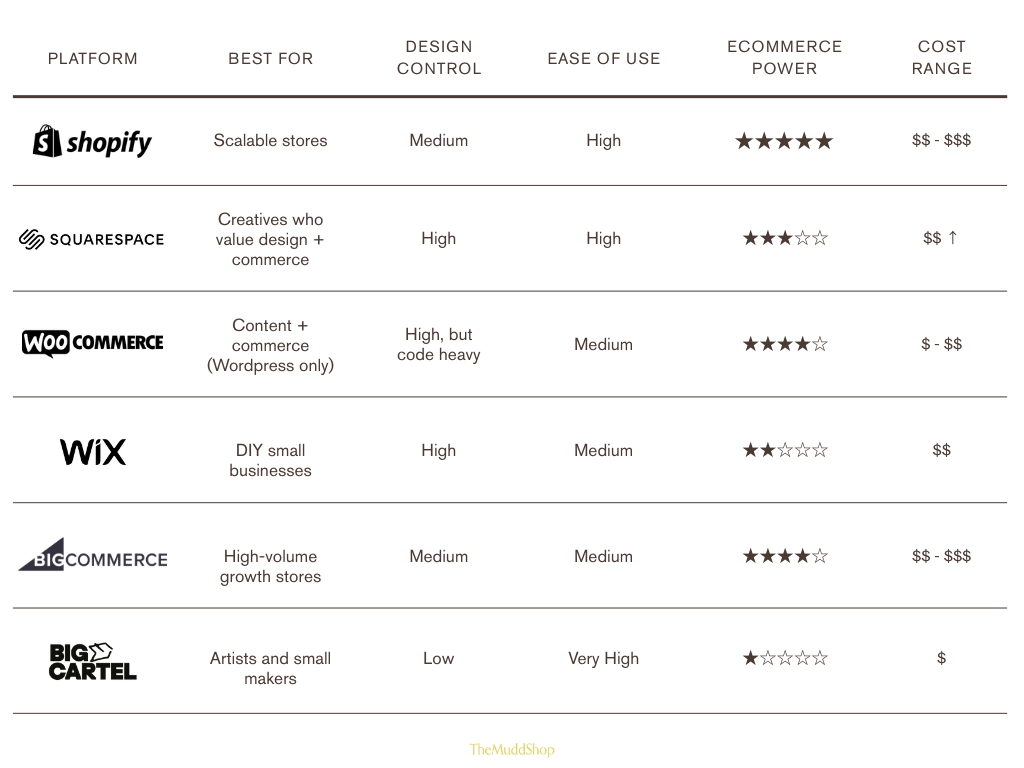
Comparison At-A-Glance
How To Choose
You want an advanced online store that scales → Shopify or BigCommerce
Design + content + blogging matter (in addition to selling) → Squarespace or WooCommerce
You want simplicity without any coding → Squarespace or Wix
You’re a maker or creative with a tiny catalog → Big Cartel
Testing handmade products without your own store → Consider Etsy (for now, but not forever)
There’s no perfect platform — only the one that matches your goals
Shopify = Best eCommerce engine
Squarespace = Best for beautifully branded sites with eCommerce functionality
WooCommerce = Most flexible & SEO-friendly (Wordpress only)
BigCommerce = Enterprise features out of the box
Big Cartel = Great starter option for small makers
Etsy = Built-in marketplace traffic, but very high fees & limited control
If you’re ready to invest in a website but can’t clearly explain your brand, audience, or messaging → start here.
A website without strategy is just expensive guessing. Our 30+ page Brand Development Workbook helps you clarify your idea, define your audience, and articulate your messaging before you build anything. If you can’t explain your business in one sentence, your website won’t work.