Shopify vs. Squarespace
When clients ask whether they should choose Squarespace or Shopify for their eCommerce website, my answer is always: "It depends on you." Helpful, I know! While both platforms are excellent and will give you many if not all the eCommerce capabilities you need - your choice should ideally hinge on your specific needs and preferences. Here are two things to consider:
FIRST — Consider what you sell. Do you offer physical products, services, or memberships? Shopify shines with large volumes of physical goods, thanks to its robust eCommerce features. Squarespace, on the other hand, excels with a broader range of offerings, especially when it comes to service-based businesses or more visually-driven websites.
SECOND — Think about how customizable your products are. Squarespace handles simple customizations, like adding a single monogram to a product, with ease. However, for more complex scenarios—such as varying price per monogram letter—Shopify, often via third-party plugins, may be the better choice.
Complex needs aside, both platforms can accommodate diverse requirements. I’ve successfully managed stores with thousands of variants on Squarespace and streamlined services on Shopify. The key is matching the platform to your business model and workflow and which platform you’re most comfortable.
In essence, Shopify was built for eCommerce, while Squarespace offers eCommerce as part of a broader web-building toolkit. Your ideal platform will depend on your product types, feature needs, and personal comfort with each platform. Whichever you choose, if you work with TheMuddShop we will ensure your shop reflects your vision, connects with your ideal customers, and provides an outstanding shopping experience.
***Rates and information as of Dec 12, 2025
First - LET’S TALK CREDIT CARD PROCESSING FEES
If you're looking to sell online goods or services and accept credit card payments online, credit card processing fees are just part of the deal. Think of them like the rent or utilities for a physical store. These fees cover everything from handling transactions to managing fraud and ensuring secure payments. While they might seem like an extra cost you don’t want to incur, accepting credit cards is essential to reaching customers online. The convenience and increased revenue you gain from offering credit card options (e.g. instead of things like venmo) usually makes these fees a smart investment for growing your online business.
Shopify
Shopify was built specifically for online selling - they’re focused on giving you powerful tools to run and grow an eCommerce business. They provide a full eCommerce ecosystem where you can manage inventory, process orders, sell on multiple sales channels (like social media, marketplaces and in-person), and can scale as your business grows. Shopify handles web-hosting as well as fraud protection for you, so you don’t need other services to keep your online store running and secure. However, they also rely heavily on their-party apps/plugins depending on the theme you use for your eCommerce store (see, the themes section below).
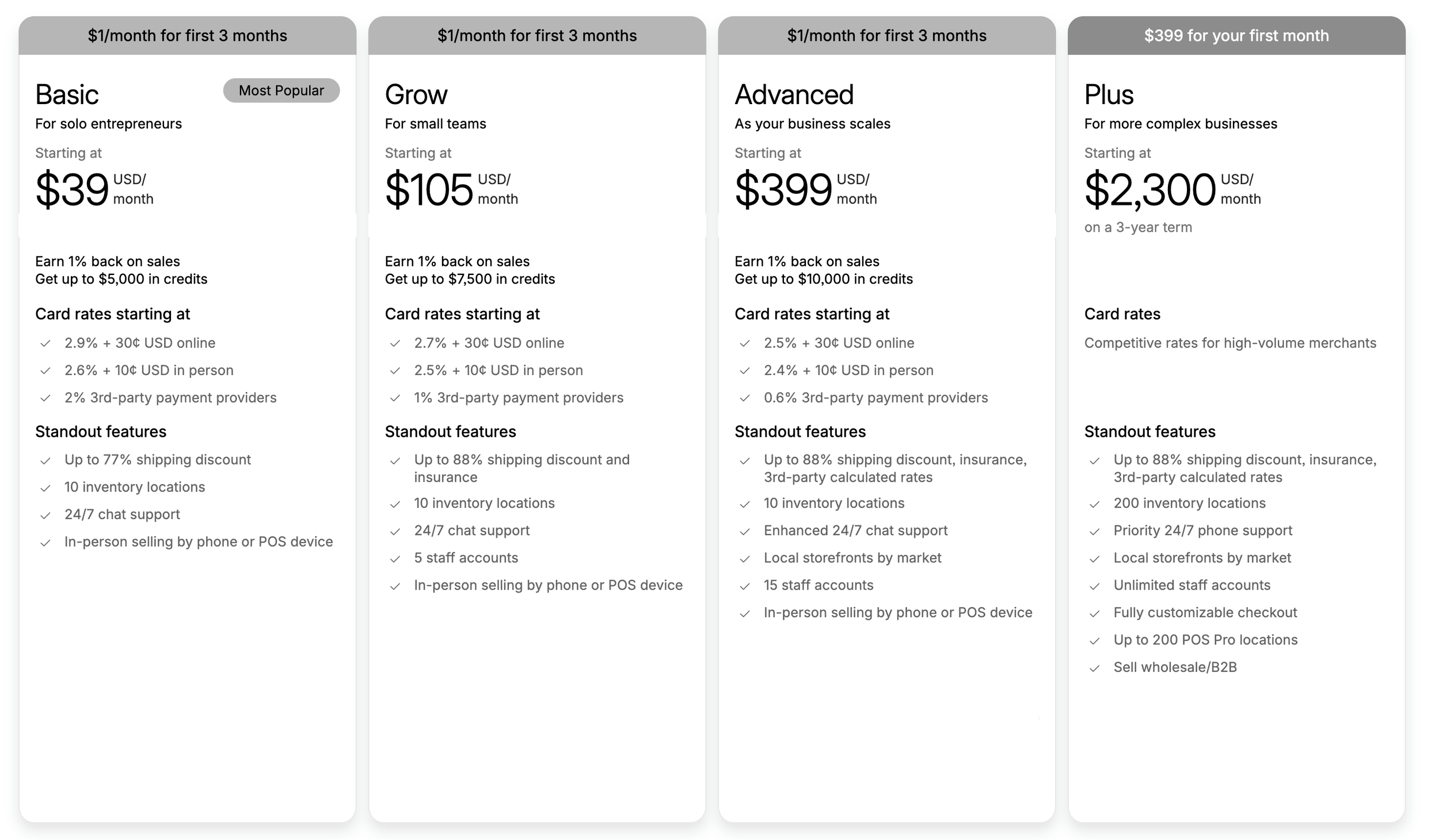
Their annual Plans is shown here →
Shopify offers a ≈ 25% discount if you pay for your plan annually instead of monthly. If you prefer to pay monthly, the rates are as follows - BASIC: $39/month, GROW: $105/month ADVANCED: $399/month, PLUS: is the same at $2,300/month.
Included In Every Shopify Plan
Unlimited Products: Sell as many products as you want without restrictions.
Unlimited Bandwidth: No extra charges for online visitors or file uploads.
Brand Assets: Manage your logo, colors, and slogan.
Fraud Analysis: Detect and flag potentially fraudulent orders with Shopify Payments.
Manual Order Creation: Create and manage orders directly from your admin.
Discount Codes: Offer and manage discount codes and combinations.
Custom Pricing by Market: Adjust prices for specific regions and show local currencies (with Shopify Payments).
Abandoned Cart Recovery: Automatically email customers who leave without completing their purchase.
Analytics: Access key metrics like sales and visitor data.
Finance Reports: View and analyze financial data, including sales and payments.
Customer Support: 24/7 support via the Shopify Help Center.
Online Sales Channels: Sell through various online platforms and manage them from one admin.
Shopify POS: Process in-person sales with the Shopify POS app for iOS and Android.
Shopify Features
SHOPIFY PAYMENTS — Shopify Payments is Shopify’s integrated fraud protection payment gateway, eliminating additional transaction fees ranging from 0.5% to 2% based on your plan. While you still pay standard credit card rates, using Shopify Payments avoids those extra fees. Shopify supports major payment gateways like PayPal, Amazon Pay, and Square, as well as over 100 other options. Note: Shopify Payments is currently only available in 17 countries.
SHOPIFY THEMES — Shopify requires a theme in order to launch you online store. You can choose from this wide range of free and purchasable themes -suitable for different industries, design needs and features/funtaionalities. All themes are elegant, attractive, and mobile-responsive. When working with TheMuddShop we customize and optimize your chosen theme for the best layout, navigation, user experience, SEO, back-end management, load speed, and install any third-party integrations you may need
SHIPPING — Shopify Shipping provides printable shipping labels and discounted, pre-negotiated rates with major carriers like USPS, UPS, DHL (including DHL Express and DHL eCommerce in the U.S.), and other regional carriers depending on your location. If you wish to show real-time (carrier-calculated) shipping rates from FedEx, UPS, USPS, and other carriers (based on order weight/dimensions shown at checkout) require that your store has third-party carrier-calculated shipping enabled. This feature is included by default on the Advanced Shopify and Shopify Plus plans.
TAXES — Shopify automatically applies tax rates for specific regions, including the US, UK, EU, Canada, and Australia. For other regions, you can set up default taxes or customize them based on local tax laws and regulations.
CURRENCY — Shopify supports multi-currency selling, but you must use Shopify Payments as your payment processor. Alternatively, you can use third-party apps like Bold Multi-Currency to enable multi-currency sales.
FRAUD PROTECTION — Shopify takes steps to help protect against fraudulent orders. With Shopify, you can assess the risk level of each order and make informed decisions on whether or not to ship the order. This allows you to minimize the risk of losing money or inventory to fraudulent activities. By sharing the fraud risk on every order placed on your site, Shopify helps you stay vigilant and protect your business.
Shopify Ecommerce Website Cost Breakdown*
DOMAIN NAME → ≈ $15 - $25 (ANNUALLY)
This functions as your website’s online address - how people find your site (www). Domain prices vary based on the popularity of your desired name. It’s important to keep your domain active and renewed annually so your website remains live and accessible at all times.
SHOPIFY PLAN → $350 - 950 (ANNUALLY)
Shopify serves as both your website platform and web host, all in one - so there’s no need to purchase additional hosting from an external provider (e.g., HostGator, Namecheap, GoDaddy). Your Shopify plan runs on a subscription model, you can choose to pay monthly or annually (paying annually typically saves you about 25%). Certain features and credit card processing fees vary depending on the Shopify plan you choose (see the pricing graphic above). Shopify includes a brief 3-day free trial, to test things out before committing.
SHOPIFY THEME → $150 - 350 (ONE TIME)
Every Shopify store requires a theme to define its front end. You can browse themes available for purchase here. (Note: there are FREE themes available with Shopify, however they might have feature limitations.) Shopify provides a default theme when you create an account.
WEB DESIGNER / DEVELOPER → $350 - 1250 (ONE TIME)
Once you’ve chosen / purchased your Shopify theme, your web designer, aka TheMuddShop ;) will handle all setup and customization of your chosen Shopify theme matching it align with your brand, and setting up all the backend details necessary for a successful eCommerce site (backend configuration such as payment processing, shipping, product setup, SEO, and ensuring your site is optimized and ready for customers). We take the typically overwhelming process of building a website and streamline it start to finish, handling all heavy lifting and customizations for you. We prompt you when needed and work collaboratively to deliver a fully customized, one-of-a-kind eCommerce site you can be proud of.
THIRD-PARTY APPS → $5 - 50 (PER MONTH/APP)
Shopify is a powerful eCommerce platform but still has its limitations. To enhance your site’s functionality, you might need to integrate additional apps, which are purchased separately, usually on a monthly basis. Examples include analytics tools, SEO optimizers, marketing automation, advanced product variants, shipping carriers, and data insights.
WEBSITE MAINTENANCE → $175 - 475 (PER MONTH / AS NEEDED)
After your site launches, you may need ongoing support such as content updates, performance checks, or functionality optimizations. We offer monthly maintenance plans to assist with all post-launch needs.
*all costs are approximates/estimates and subject to change
Squarespace
Squarespace is known for making beautiful, easy-to-build websites, as well as online store functionality. While its eCommerce tools are much simpler than Shopify’s, they are still very capable and are built into the same platform you use for your website. Squarespace is ideal if you value design flexibility and still want a strong visual brand presence with your eCommerce website. It’s also the more affordable entry-level option for eCommerce. You will pay payment processing fees on sales, and some Squarespace plans may charge a small transaction fee, but Squarespace bundles website design, hosting, and eCommerce/store management all in one place - meaning you only have to login to one account to access sales and your entire website. It’s a great choice for smaller or medium-sized stores or businesses that want beautiful web content and eCommerce in the same platform.
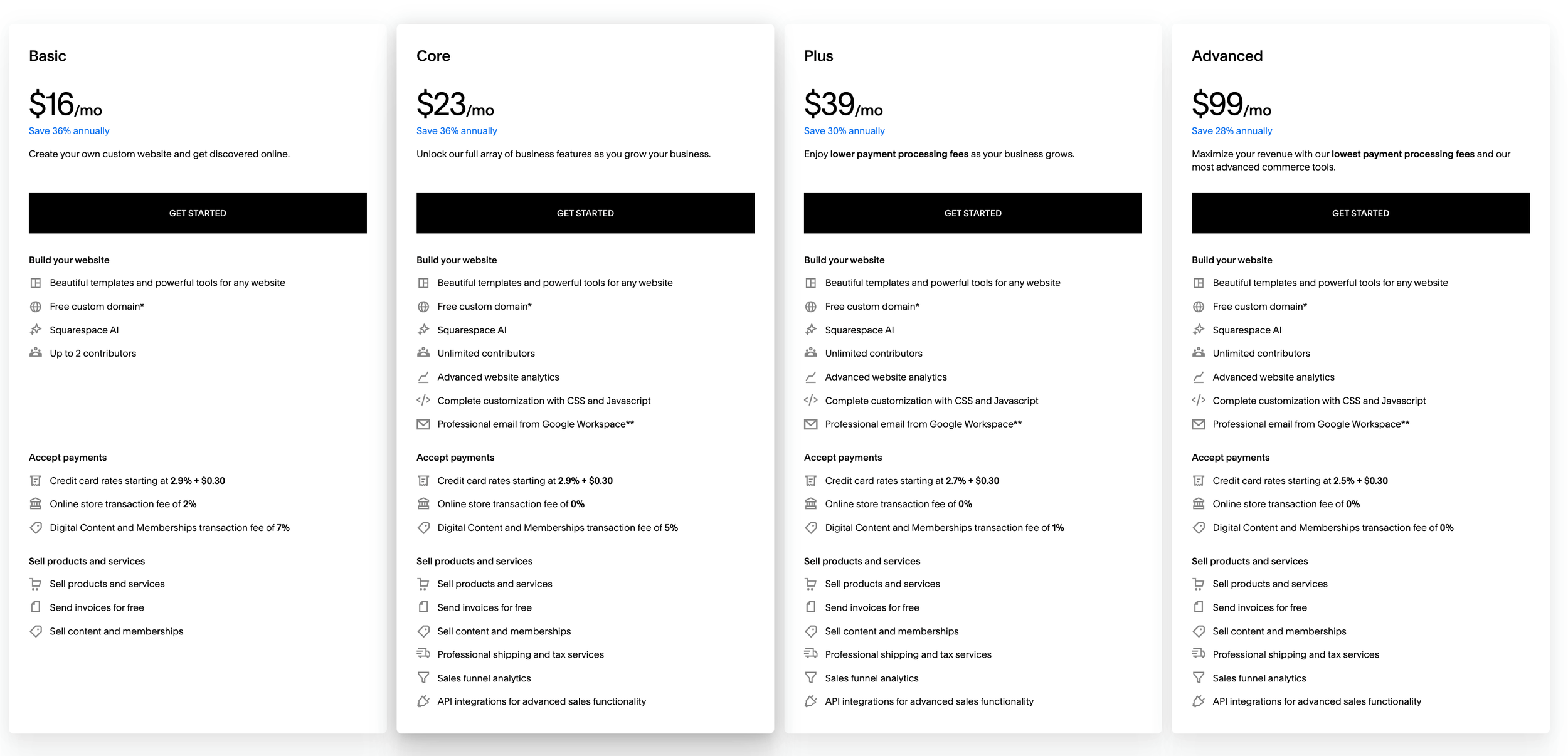
Their annual plan rates shown here →
If you prefer to pay monthly, the rates are as follows: BASIC: $25/month, CORE: $36/month, PLUS: $56/month, ADVANCED: $139/month.
Note: You can connect your eCommerce store to the one or all of the following third-party payment processors: Stripe, PayPal, or Square. If you decided to use Squarespace Payments (Squarespace’s built-in payment processor) every time you process a transaction, you’ll be charged a fee based on these payment processing rates. The Squarespace Payments service fees are set out below, with rates differing depending on your billing plan and the country in which your business operates. With Squarespace Payments, you can also unlock some lower payment rates with our new website billing plans. Squarespace Payments is fully integrated within the Squarespace platform, which simplifies accepting and managing payments, however something to note: Squarespace Payments has reportedly started placing some merchant accounts into reserve/on hold. This means a percentage of the money from your sales could be held for weeks or even months, depending on the perceived risk of your account. While they aim to manage financial risk, this has been frustrating for many businesses that were expecting full access to their revenue.
Included In Every Squarespace Plan
Fully-managed Cloud Hosting: ensuring your website remains available at all times
Unlimited Bandwidth: the amount of photos stored or visitors on a site won't affect load speed
14-day Free Trial! (for first-time users)
Customizable Layouts: dozens of modern and minimalistic templates that we can customize and tailored to your wishes.
Mobile & Tablet Friendly: Every design automatically includes a unique mobile experience that matches the overall style of your website, so your content will look great on every device, every time.
Multiple Contributors and Access Levels: Give contributors selective access to your site, depending on their permissions.
Rich Image Manager: add and organize images via drag & drop builder. Edit images with ease.
Blogging: design and manage your own blog.
Built-in Analytics & Metrics: detailed analytics where you can track traffic, popular content, sales, and more.
Built-in SEO Tools: No plugins needed. Squarespace gives you everything you need to have an SEO-ready site.
Customer Support: fast and friendly support and numerous community forums
Extensions: Third-party tools may help you manage and grow your business. See individual detail pages for supported countries.
Squarespace Features
SQUARESPACE PAYMENTS — Squarespace Commerce integrates seamlessly with several payment gateways, including Squarespace's own payment processor, or you can link to a Stripe or PayPal account to accept payments. While Squarespace doesn’t charge additional transaction fees beyond standard credit card processing rates, using its native payment solutions can simplify your setup. Note that Squarespace Payments is currently available in multiple countries, though its specific availability may vary.
SQUARESPACE “TEMPLATES” — Squarespace offers a wide range of elegant, industry-specific designs to be mobile-responsive and visually appealing. So there’s no need to purchase an external or third-party template/them. And when you hire with TheMuddShop, we ensure your Squarepsace website is 100% customized and finely tuned for performance and functionality you desire.
SHIPPING — Squarespace provides shipping label printing through its integration with major carriers like USPS, UPS, and DHL. It also offers the capability to set up shipping rules and rates, though pre-negotiated rates are not included. For more advanced shipping features, such as calculated shipping rates and additional carrier integrations, you may need to explore third-party services or upgrade to a higher plan.
TAXES — Squarespace automatically calculates sales tax for specific regions, including the US and EU, based on the customer’s shipping address. For other locations, you can manually set up tax rates or use custom tax rules to comply with local regulations.
CURRENCY — Squarespace supports selling in multiple currencies, though this feature requires integrating with a third-party service. With the right setup, you can offer your customers the ability to view prices and make purchases in their preferred currency.
squarespAce Ecommerce Website Cost Breakdown*
DOMAIN NAME → ≈ $15 - $25 (ANNUALLY)
This functions as your website’s online address - how people find your site (www). Domain prices vary based on the popularity of your desired name. It’s important to keep your domain active and renewed annually so your website remains live and accessible at all times.
SQUARESPACE PLAN → ≈ $192 - 588 (ANNUALLY)
Squarespace serves as both your website platform and web host, all in one - so there’s no need to purchase additional hosting from an external provider (e.g., HostGator, Namecheap, GoDaddy). Your Squarespace plan runs on a subscription model, and you can choose to pay monthly or annually (paying annually typically saves you about 30%). Certain features and credit card processing fees vary depending on the plan you choose (see the pricing graphic above). All plans include a 14-day free trial, allowing you to test the platform before committing.
SQUARESPACE TEMPLATE → INCUDED
Squarespace provides a variety of elegant, mobile-responsive designs built into the platform, so there's no need to buy external templates.
WEB DESIGNER / DEVELOPER → ≈ $2500 (ONE TIME)
After creating your Squarespace account, your web designer, aka TheMuddShop ;) will handle all setup, customization, and backend details necessary for your eCommerce site. This includes backend configuration such as payment processing, shipping, product setup, SEO, and ensuring your site is optimized and ready for customers. We take the typically overwhelming process of building a website and streamline it from start to finish, handling all heavy lifting and customizations for you. We prompt you when needed and work collaboratively to deliver a fully customized, one-of-a-kind eCommerce site you can be proud of.
THIRD-PARTY APPS / EXTENSIONS / PLUGINS → ≈ $15 - 99 (PER MONTH/APP)
Third-party extensions are rarely needed with Squarespace due to its robust, all-in-one platform. However, Squarespace does offer integrations with third-party services that can be easily added to your eCommerce website if needed. These extensions are available at an additional cost outside of your Squarespace plan.
WEBSITE MAINTENANCE → $175 - 475 (PER MONTH / AS NEEDED)
After your site launches, you may need ongoing support such as content updates, performance checks, or functionality optimizations. We offer monthly maintenance plans to assist with all post-launch needs.
*all costs are approximates/estimates and subject to change
A SIDE BY SIDE COMPARISON
Products + Variants
Shopify
PRODUCT LIMITS — Technically unlimited products, though performance may degrade with very large catalogs (over 50,000 products).
VARIANTS — Each product can have up to 3 options and up to 100 variant combinations. More options and combinations are available through third-party apps.
PRODUCT TYPES — Supports physical, digital, and subscription products. Other types such as memberships or additional custom products typically require third-party apps.
DROPSHOPPING — Extensive network for dropshipping integrations.
Squarespace
PRODUCT LIMITS — You can have up to 10,000 products per store, and you can use multiple pages if needed.
VARIANTS — Each product can have up to 6 options and up to 250 variant combinations.
PRODUCT TYPES — Supports physical, digital, service, subscription products, memberships, events, and classes. All without needing third-party apps.
DROPSHIPPING — Possible only through these Squarespace Extensions.
Shipping + Fulfillment
Shopify
CARRIER CALCULATED RATES — Available for DHL, UPS, USPS (US), and Canada Post (Canada) via Shopify Shipping. FedEx rates require a separate FedEx account.
SHIPPING ZONES — Create shipping zones based on countries. Zip/postal code-based zones are possible with third-party apps.
SHIPPING LABELS — Print and pay for labels through Shopify Shipping or third-party extensions.
FULFILLMENT — Custom third-party fulfillment and Fulfillment by Amazon are available with an Amazon Seller Central account.
MULTI-ORIGIN SHIPPING — Available for tracking inventory across multiple locations.
PRINT ON DEMAND — Available through various third-party apps.
Squarespace
SHIPPING METHOD — You can setup either free, flat rate, or weight-based shipping options with any carrier.
CARRIER CALCULATED RATES — Available for FedEx, UPS, and USPS (US only).
SHIPPING ZONES — Allows creation of shipping zones based on country, state/province, and zip/postal code (US & Canada).
SHIPPING LABELS — Print and pay for labels directly through Squarespace or via shipping extensions.
FULFILLMENT — Third-party fulfillment is supported through Shipwire or Fulfillment by Amazon via ShipStation.
MULTI-ORIGIN SHIPPING — Possible through shipping extensions.
PRINT ON DEMAND — Possible only through these Squarespace Extensions
Content + Design
Shopify
HOMEPAGE CONTENT — Depends on the theme you’ve purchased. Themes vary in customization options for home page content.
INTERIOR PAGES — Created within the Shopify admin, and customizixerd via custom CSS/HTML, depending your template. Limited compared to Squarespace.
URLs — Pages follow the following URLs: example.com/pages/about
STYLE CAPABILITIES — Limited compared to Squarespace; heavily reliant on theme and custom CSS/HTML.
BLOGGING — Basic blogging capabilities, knowing CSS/HTML is helpful and more advanced features depend on your theme.
SEO FEATURES — Basic SEO features included, however more advanced SEO may require code access or third-party apps.
Squarespace
DESIGN FLEXIBILITY — All design layouts and features are available for all pages.
CUSTOMIZATION — Customize any page using various content blocks. Create galleries, forms, event calendars, and portfolios without the need of third-party plugins or CSS/HTML.
URLs — Tidy URLs for all pages: example.com/about
STYLE CAPABILITIES —Extensive style options for page elements.
BLOGGING / PODCASTING — Rich capabilities are built right in.
SEO FEATURES — Included easy-to-use and update SEO features.
In a nutshell
SHOPIFY was built specifically for eCommerce, offering a powerful, all-in-one system designed to sell products at scale; built-in tools like fraud protection, multiple payment options, international currencies, and multi-channel selling. The trade-off is a higher monthly cost, especially as you upgrade for more advanced features.
SQUAREPACE is a website design platform that includes eCommerce as part of a broader content and branding toolkit. They’re known for its beautiful layouts, strong design, and simple setup - making it a more affordable option for entry level businesses! However, its eCommerce features are a bit more limited compared to Shopify, which may be a factor as your store grows.
We hope this gives you a clearer picture each platform and their unique eCommerce strengths and weaknesses. Remember, the best platform for your online store depends on your product type(s), feature requirements, and how comfortable you are with each platform. Choose what feels right for you and your business.
If you’re ready to move from research to execution, TheMuddShop helps businesses design, customize, and launch Shopify and Squarespace online stores - built for performance, not guesswork.
To get started, complete the intake form on our Web Design page. This puts you in our queue so we can help bring your online store to life.
Image credit: Astrolabium, Johannes Angelus (Author), Erhard Ratdolt (Printer). Woodcuts, 1488. The Walters Art Museum